
Industrial Design, Complex Surfacing and Reverse Engineering inside SOLIDWORKS®!
- Amazing Sub-D Modeling tools!
- Work Right Inside of SOLIDWORKS®!
- Design changes in minutes not hours!
- Don't let complex organic shapes ruin your day.
Power Surfacing to the Rescue! -
- Power Surfacing RE Videos and Tutorials

- Do you need to create SOLIDWORKS® geometry from scanned meshes or other sources?
- Do you struggle to create freeform/organic shapes with SOLIDWORKS®?
- Do you have difficulty creating aesthetically pleasing Class A surfaces with tangent and curvature continuity?
Power Surfacing RE (Reverse Engineering) is the solution you need to get your job done effectively and quickly!

Privacy Statement:
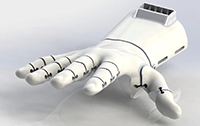 |
| Model created by - Mat Bowtell, founder of Free 3D Hands
|
Customer Coment: "Power Surfacing RE has completely opened up new horizons for what I am able to design in within Solidworks. I was able to design in days what would have previously taken months. It has allowed me to create organic shapes and edit scanned meshes with ease. With Power Surfacing RE, I have been able to take my prosthetic hand designs to a whole new level, and I am now only limited by my own imagination. I cannot thank NPower Software enough" - Mat Bowtell, founder of Free 3D Hands
|
 |
 |
| Created by - Andries van Overbeek, His Gallery
|
| Customer Coment: "For me personally PowerSurfacing is an incredibly powerful and enabling tool, I'm very happy I came across it!
PowerSurfacing makes the CAD process much more joyful, intuitive and playful and less tedious."- Andries van Overbeek
|